Describe what the scene needs — tense investigative underscore that never
resolves, something warm under a 30-second voiceover — and get real
cues back, each with a link to hear it. No tag-guessing, no wading through pages.
Every cue carries an editorial description of how it actually behaves. That is what
your brief is matched against — not a keyword list.
Searches meaning
Ask for things that were never tags: whether a cue resolves or stays suspended,
whether it leaves room for a voiceover, how its energy moves across the edit.
Fits your runtime
Ask for 30 seconds and you get cues that naturally run close to it and
purpose-made 30-second edits — usually the better answer, because a cutdown is
built to land rather than fade.
Knows what else exists
Most cues have stems, alternate mixes and timed cuts. If something is nearly
right but needs to sit under dialogue, there is usually already a version that
does.
The catalogue
Twenty years of Songs To Your Eyes — written and produced in-house, used in
broadcast, film, advertising and games worldwide.
Thousandsof main cues
Stems& alternate versions
Albumsacross every genre
2005Established
How to connect our MCP to your LLM
In plain English: this adds our music catalogue as a tool your AI assistant can use.
It takes about a minute, nothing is installed on your computer, and there is no
account to create. Pick whichever assistant you already use.
Step zero — copy this. You will paste it into every method below.
https://mcp.songstoyoureyes.com/mcp
Claude
claude.ai in a browser, or the Claude desktop app · paid plan needed
Open Claude and click your name or initials in the bottom-left corner,
then choose Settings.
In the menu on the left, click Connectors.
Click Add custom connector. A small window opens.
In Name, type anything you like — Songs To Your Eyes
is a good choice, because that is the label you will see later.
In Remote MCP server URL, paste the address you copied above.
Leave every other box empty. If you see fields called OAuth Client
ID or Client Secret, they stay blank — our catalogue needs no
login. Filling them in is the single most common way this goes wrong.
Click Add. You should now see eight tools listed. That
means it worked.
Start a new chat, make sure the connector is switched on in the tools
menu under the message box, and ask for music.
Grok
grok.com · works on a FREE account
Open the sidebar on the left and choose
Skills and Connectors, then the
Connectors tab.
Click New Connector (top right). A box opens titled
Custom Connector.
Name: Songs To Your Eyes. Server URL: paste the address you
copied above. That is all — Grok asks for nothing else, and there is no
login to set up.
Click Add Connector. Open the connector afterwards
and you should see All tools enabled with eight
tools listed. That means it worked.
In a chat, open the + menu in the message box, choose
Connectors, and make sure
Songs To Your Eyes is switched on.
Ask for music — describe the scene, the feeling, or the instruments you
want to hear.
Mistral AI
chat.mistral.ai · works on the free plan too
Open the sidebar on the left and choose
Intelligence, then
Connectors.
Click + Add Connector.
Switch to the Custom MCP Connector tab — the first tab
only lists ready-made ones.
Give it the name Songs To Your Eyes and paste the address above.
Click Add, then Connect. Skip
the API token box — we do not use one.
In a chat, open the Tools menu and tick our connector
so Le Chat is allowed to use it.
Perplexity
perplexity.ai · Pro, Max or Enterprise · desktop browser
Click your profile in the bottom-left corner, then
All settings.
In the left-hand menu, click Connectors.
Click + Custom connector and choose
Remote.
Name: Songs To Your Eyes. MCP Server URL: paste the address
above.
Open Advanced and set Transport to
Streamable HTTP. Leave authentication as none.
Tick the box acknowledging that custom connectors carry risk, then click
Add.
In a thread, switch our connector on so Perplexity can use it.
Google Gemini
gemini.google.com · Google AI Pro or higher — Gemini only
offers custom apps on a Pro plan or above, so on the free plan the option
is simply not there · personal Google Account only — work and school
accounts cannot use this
Check your plan: Custom apps for Spark appears only
on Google AI Pro or a higher plan. If you are on the free plan you
will not find the menu below, however carefully you look.
Make sure Keep Activity is switched on in
your Gemini settings. Gemini refuses to connect custom apps while it is
off — this is the step that silently blocks most people.
Use a computer: custom apps can only be connected in the Gemini
web app. Once connected, the app is available in the Gemini mobile app
too.
Go to gemini.google.com. At the bottom, click
Settings & help, then
Connected Apps. If you don't find Connected Apps,
first click Personal Intelligence, then
Connected Apps.
Under Custom apps for Spark, find the
Add a custom app link to get started field — or,
if you have connected a custom app before, click
Add a custom app.
Enter the address above as the app's MCP server URL. Leave
Advanced features alone — that is for servers that
need credentials, and our catalogue needs no login.
Click Next and follow the on-screen
instructions.
In a chat, enter @ and select the app, so Gemini uses it for that
prompt — this is how Gemini decides which connected app to call.
Gemini calls these "custom apps for Spark". Not yet offered in
the EEA, UK or Switzerland, and English-only for now — Google is still
rolling this out, so the menus may shift.
Cursor
Cursor desktop app only — custom MCPs cannot be added in
Cursor's browser version · two ways in: Cursor's own screen, or its settings
file. Both end up in the same config.
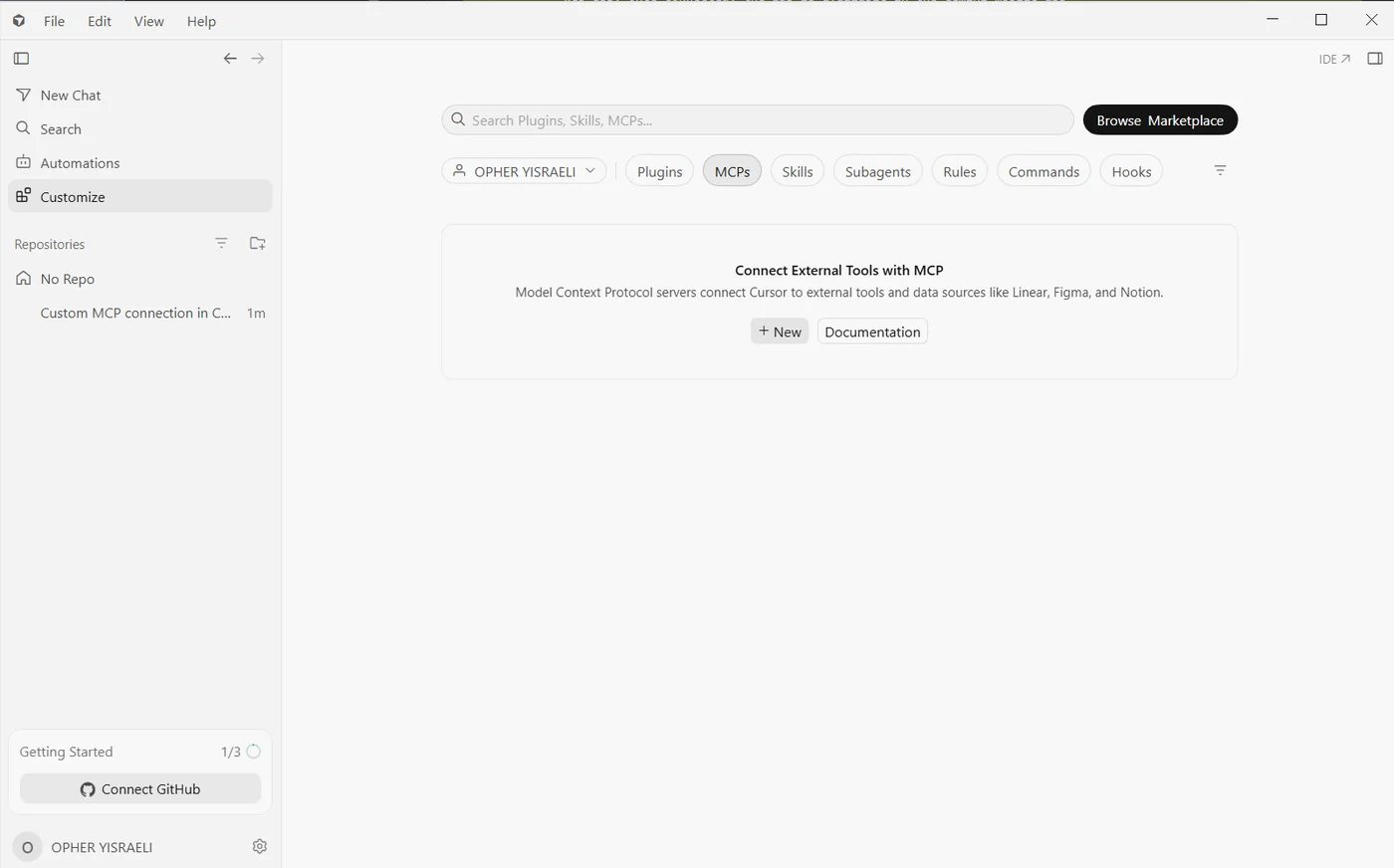
Open Customize in the left sidebar — or open the
Command Palette and choose View: Open MCP Settings.
Click MCPs in the row of tabs along the top.
Click + New. Depending on your version this is
labelled Add Custom MCP or
New MCP Server.
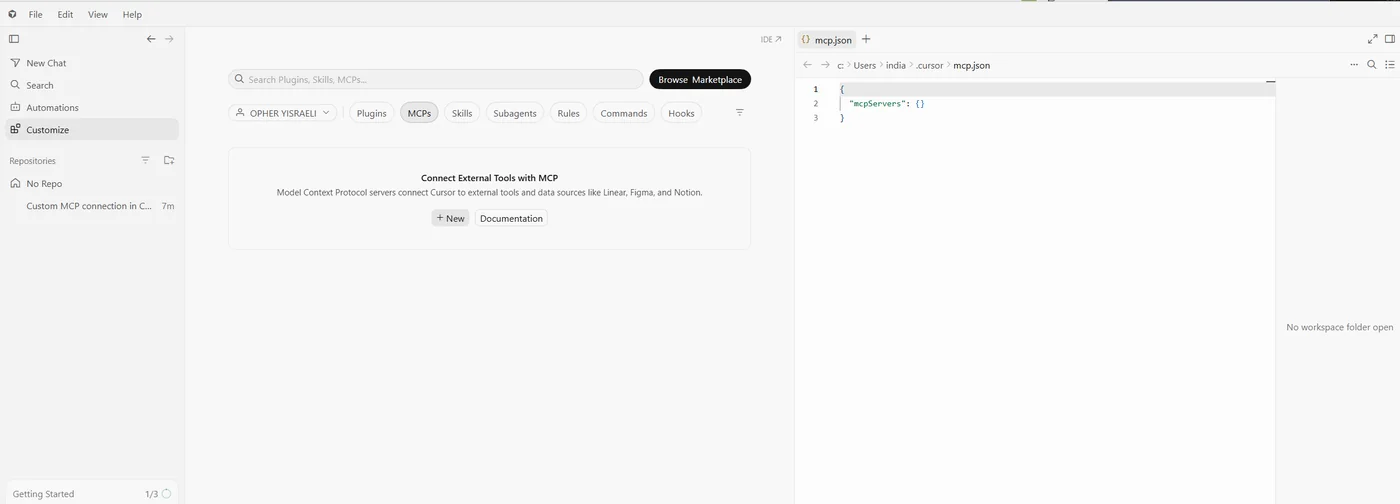
Cursor opens mcp.json — or a form. Add our server:
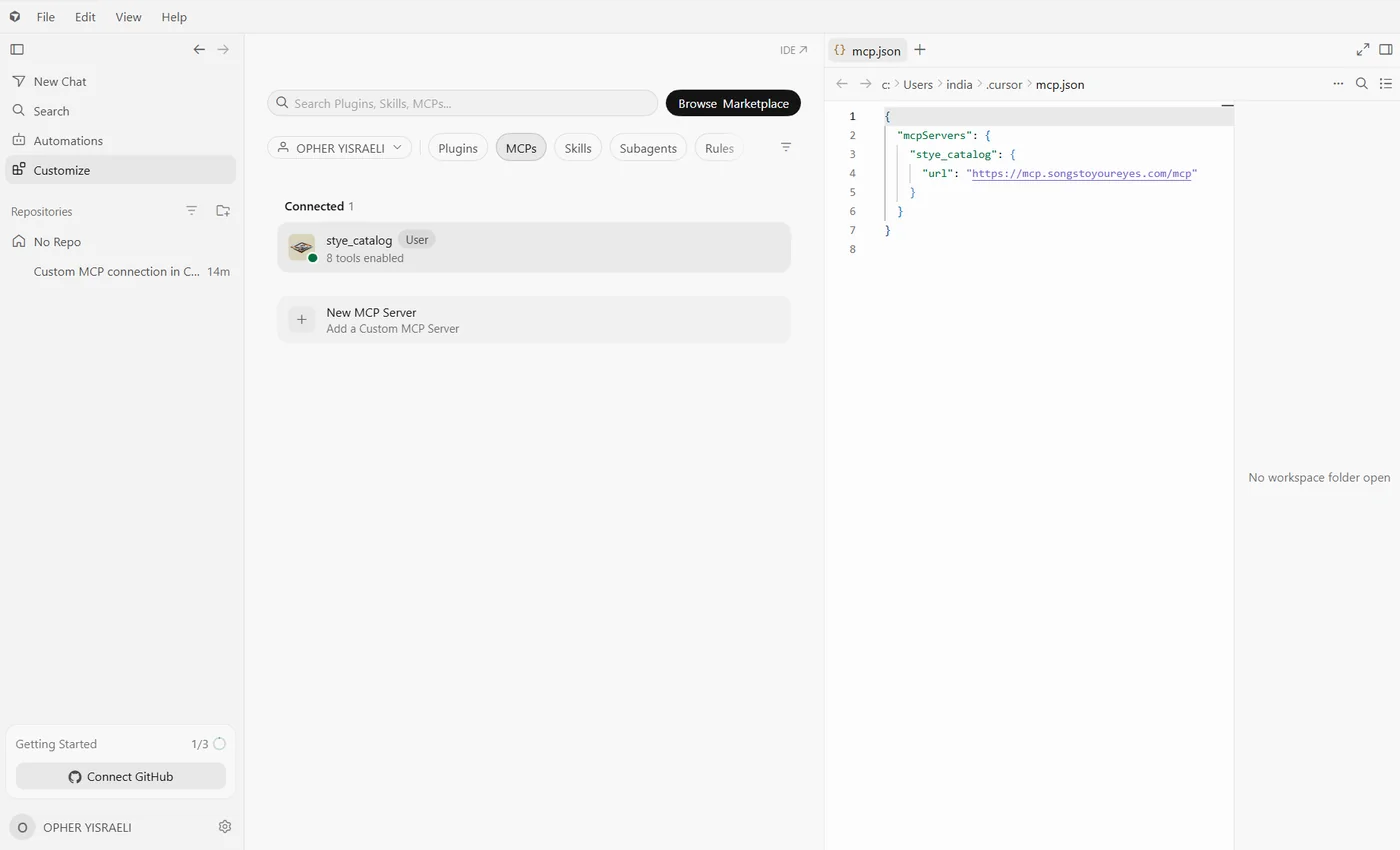
{ "mcpServers": { "stye_catalog": { "url": "https://mcp.songstoyoureyes.com/mcp" } } }
Save, then check the server is toggled on in the MCPs list if it
isn't already.
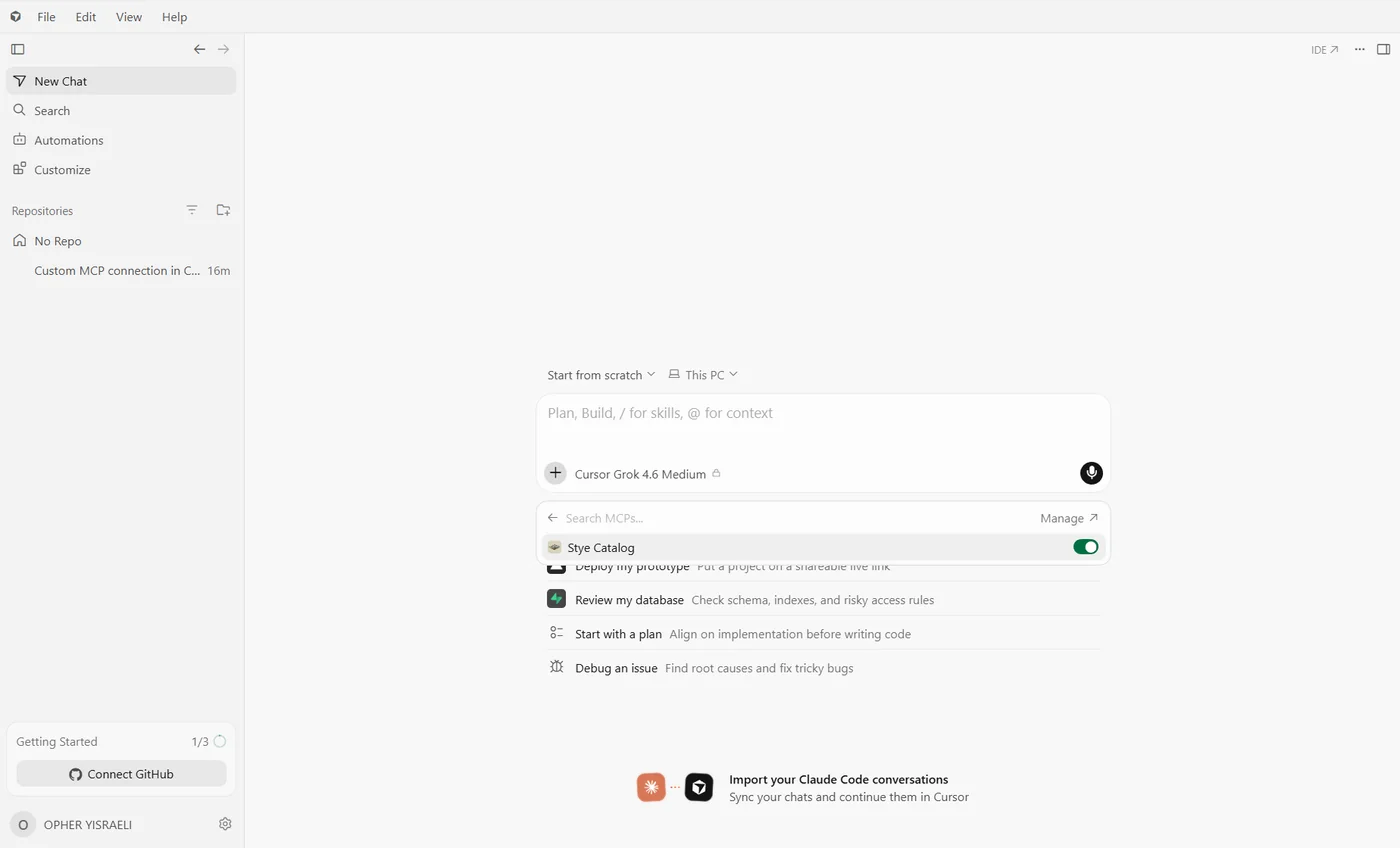
In a chat, press the + beside the model name and,
under Search MCPs, make sure
Stye Catalog is switched on for that conversation. Then describe
the scene you need music for.
The MCPs tab before anything is added — + New
opens mcp.json
mcp.json opens beside the tab — our server goes inside mcpServers
When it has worked: stye_catalog under Connected,
8 tools enabled, green dot — and the filled-in file beside it
In a chat: the + beside the model name lists
your MCPs — Stye Catalog switched on means it is in play
Prefer the file? Creating or editing
.cursor/mcp.json with the same block does exactly the
same thing.
VS Code & developer tools
for people comfortable editing a settings file
In VS Code with Copilot, this goes in
.vscode/mcp.json, with "type": "http"
alongside the URL:
{ "servers": { "stye_catalog": { "type": "http", "url": "https://mcp.songstoyoureyes.com/mcp" } } }
In Claude Code, one command does it:
claude mcp add --transport http stye https://mcp.songstoyoureyes.com/mcp
In OpenAI Codex, either run
codex mcp add stye --url https://mcp.songstoyoureyes.com/mcp
or add this to ~/.codex/config.toml:
[mcp_servers.stye]
url = "https://mcp.songstoyoureyes.com/mcp"
Windsurf, Zed, Cline and JetBrains all accept the same URL — the key name
differs slightly per tool. Windsurf in particular uses
serverUrl rather than url,
which is the usual reason a Windsurf config silently does nothing.
You will see a security warning. That is normal. Every assistant warns you
before adding any connector made by someone other than themselves — ours is not
singled out. Ours is read-only: it can search our music and hand you links, and it
cannot see your files, your chats or anything else on your computer. There is no
login because there is nothing to log in to.
Then just ask
Once it is connected, talk normally. Try:
“Find me a tense investigative underscore that never resolves.”
“I need something warm for a 30-second spot with room for a voiceover.”
You will get real cues back, each with a link. Click one to hear it.
Menus move as these apps update. If something has shifted, the shape is always the
same: Settings → Connectors → add a custom one → paste the address. ·
What you hear when auditioning is the full, clean recording. Downloads and
licences run at licensing.songstoyoureyes.com — nothing here conveys a licence.
Found what you need?
Nothing is bought or sold through the assistant — it finds music, that is all.
Licensing happens here, with a person, at a published price.